File Mover Blog

  • 22 Feb

    How to use global events in limagito filemover

    Most requested feature: ‘Global Events’ — available in version v2026.2.22.0

    This is especially useful when multiple rules share the same event configuration — change it once and all rules are updated automatically. It took us more time the expected but finally it is available. It is a first release so there can be hiccups, please let us know. We’ll fix them asap.

    • Setup your ‘Global Events’ using the menu item under ‘Global’:

    limagito filemover global events option

    • <Add> a new ‘Global Event’, give it a valid description and enable it.

    limagito filemover global events setup

    • Do your usual setup like you did with the Rule Events. When you are done click <Close>.

    limagito filemover global events setup

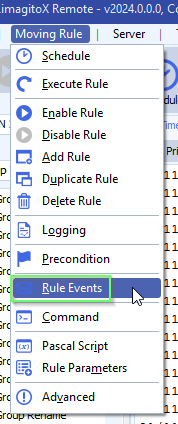
    • Open the Rule(s) where you want to use the new ‘Global Setup’.

    limagito filemover rule events option

    • Select ‘Global Event’ as Event Type and select the event you want to use. In this example we selected the previously created ‘Global event 1’.

    limagito filemover rule events setup

    If you need any help with this new option, please let us know.

    Best Regards,

    Limagito Team

    #filemover #managedfiletransfer #filetransfer #filemanagement

    By Limagito-Team Events How-to ,
  • 21 Feb

    The target principal name is incorrect

    The target principal name is incorrect

    Q: I was trying to connect to the DB called ‘XYZ’ and I tried different things with AI’s help. But I must have broken something that Limagito seems not logging new history to the DB.  And when I tried to connect to the DB from one rule, I get this message.

    limagito file mover target principal name is incorrect

    Can you help to reestablish the connection to the DB again please?

    A: The reason: ODBC 18 was installed on the system where Limagito was running. ODBC Driver 18 enforces encryption by default.

    Because this customer is really heavy into AI we added a new ‘DB Connection Parameters’ option so he can try different settings (under the Advanced Tab).

    • SQL, DB Connection Parameters option (v2026.2.19.0) [+]

    In his case he had to Add Encrypt=No to disable encryption again which he was using before he installed ODBC 18.

    limagito filemover dblogging encrypt=no

    We added this new connection parameters option also to SQL as Source and Destination (Advanced Tab).

    Some extra information:

    Our (FireDAC) MSSQL driver internally uses a client library to connect to SQL Server. On modern Windows systems the available options are:

    • SQL Server Native Client 11.0 (sqlncli11.dll) — old, often no longer installed
    • MSOLEDBSQL (OLE DB Driver) — modern Microsoft OLE DB
    • ODBC Driver 17/18 for SQL Server — as fallback

    If FireDAC cannot find a Native Client or OLE DB driver, it automatically falls back to ODBC.

    Regarding the error message from the cutomer: this is a common SSL/TLS issue with the Microsoft ODBC Driver 18 for SQL Server. Driver 18 changed the default behavior — encryption is now ON by default, unlike Driver 17.
    The error “The target principal name is incorrect” means the SSL handshake fails because the server’s certificate doesn’t match the expected hostname.

    Quick fixes in your MSSQL connection, add one or both of these parameters to your connection:

    • Encrypt=no

    or if you want to keep encryption but skip certificate validation:

    • Encrypt=yes;TrustServerCertificate=yes

    With ODBC it will be like:

    • ODBCAdvanced=TrustServerCertificate=Yes;Encrypt=No

    The new parameters makes it possible to try different setting without creating a new build.

    If you need any help about this ‘target principal name is incorrect’ message, please let us know.

    Best Regards,

    Limagito Team

    #odbc #sql #managedfiletransfer #filetransfer #filemanagement

  • 17 Feb

    Problem import data from CSV to MSSQL

    Problem import data from CSV to MSSQL

    Q: When I try to import CSV to MSSQL, I have the error because it recognizes the Field “DatabaseId” as a “Date” type. But it must be a String… How can I change this ?

    I also uncheck the checkbox “Include Metadata” in the “Bacth Move” tab. Doesn’t change anything…

    limagito file mover sql as destination

    **************

    2/16/2026 10:57:30 AM Field[43] Name: BranchName, Type: String, Size: 21

    2/16/2026 10:57:30 AM BatchMove Fail Error: [FireDAC][Comp][DM]-607. Bad text value [139173-01] format for mapping item [DatabaseId]. ‘139173-01’ is not a valid date

    2/16/2026 10:57:30 AM Batch Move Exception: [FireDAC][Comp][DM]-607. Bad text value [139173-01] format for mapping item [DatabaseId]. ‘139173-01’ is not a valid date

    2/16/2026 10:57:30 AM Total Files Redo, Count: 1 & Size: 924008

    ***********

    limagito file mover Problem import data from CSV

    A: Open your SQL as Destination setup. Default we have an automatic ‘GuessFormat’ option. You can override this, hover over the STRING field to get information.

    limagito file mover Problem import data from CSV

    • Feedback customer

    It works now. Thanks for your support !

    If you need any help about this ‘Problem import data from CSV’ question, please let us know.

    Best Regards,

    Thomas

    #csv #sql #managedfiletransfer #filetransfer #filemanagement

1 2 3 4 167
SEARCH